How SAP C4C Connects to Other Systems: A Guide to Communication Arrangements
Learn how SAP C4C integrates with other systems and why Communication Arrangements are essential for secure and seamless data flow.
How Does SAP C4C Connect to Other Systems?
SAP C4C is powerful on its own — but its real strength comes from integration.
In modern CRM landscapes, system connectivity is no longer optional — it is essential.
ERP systems, middleware, and third-party applications must exchange data seamlessly.
No integration means data exists — but without value.
🔍 Why Is Integration Challenging?
Integration projects are often more complex than expected.
Because they involve:
- Multiple systems
- Different data structures
- Strict security requirements
This is where a key concept in SAP C4C comes in:
Communication Arrangements
⚙️ What Are Communication Arrangements?
Communication Arrangements define how SAP C4C communicates with external systems.
They ensure that data exchange is:
- Secure
- Controlled
- Sustainable
The quality of integration depends on how well Communication Arrangements are designed.
🧩 What Do They Define?
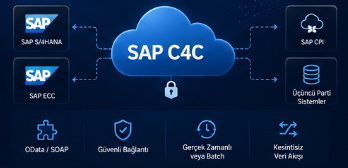
- Which service is used: OData, SOAP, etc.
- Which system is connected: ERP, SAP CPI, third-party apps
- How the connection is secured: authentication, certificates
🔄 The Backbone of Data Flow
Communication Arrangements enable data flow between systems:
- Fetching customer data from ERP
- Sending sales data from C4C
- Running real-time or batch integrations
Good integration = right data at the right time
🏢 Real-World Scenario
The most common use case:
SAP C4C ↔ SAP S/4HANA / ECC integration
If Communication Arrangements are not properly configured:
Data flow simply does not happen.
🎯 Conclusion
Communication Arrangements are at the core of SAP C4C integrations.
When done right:
- Systems run smoothly
- Data flows reliably
- Business processes remain uninterrupted