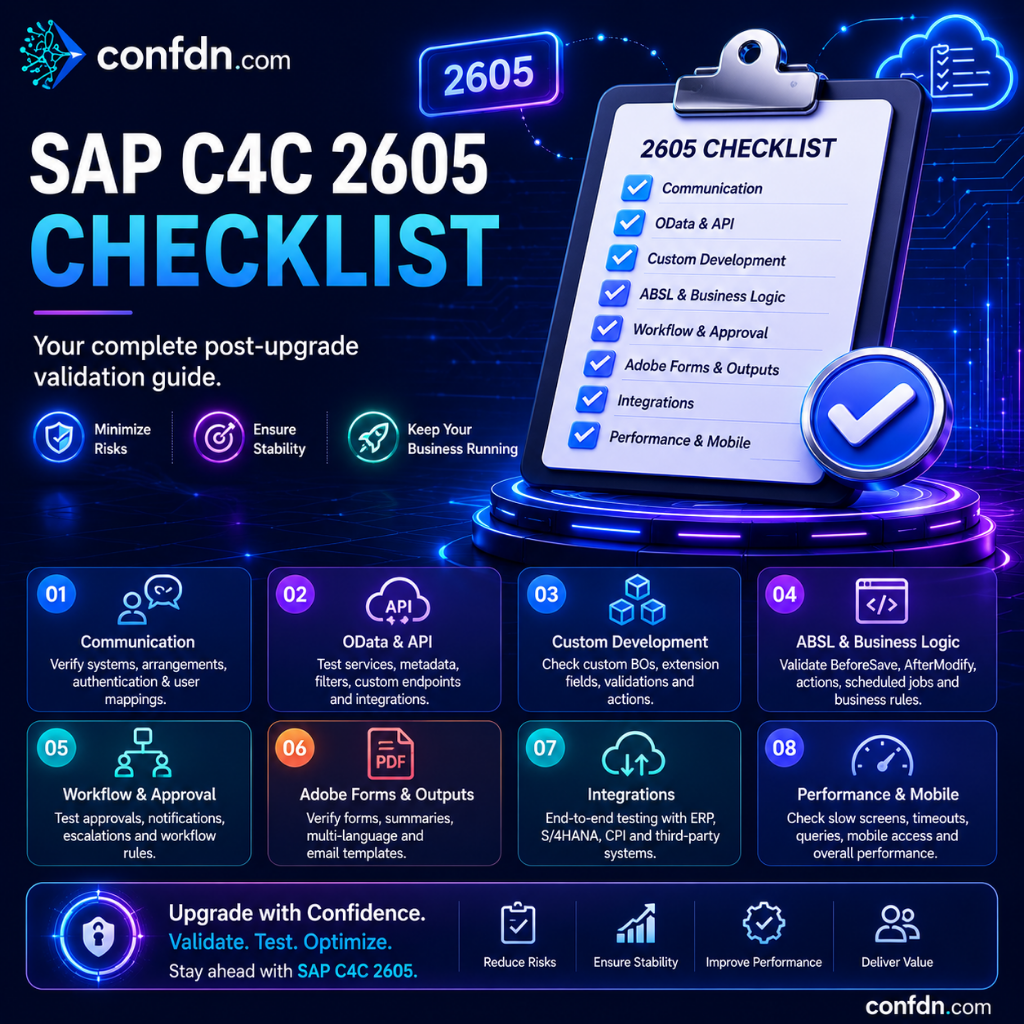
SAP C4C 2605 Checklist
A comprehensive post-upgrade validation checklist for SAP C4C 2605 covering Communication, OData, ABSL, Workflow, Adobe Forms, and integrations.
SAP C4C 2605 Checklist
Every SAP Sales Cloud and Service Cloud release introduces new features, performance improvements, and security enhancements. However, a successfully completed upgrade does not necessarily mean that the system is operating flawlessly.
In environments with complex integrations, custom developments, or multi-country deployments, issues may not become visible immediately. Some problems only emerge days or even weeks after the upgrade.
For this reason, successful SAP projects do not treat a release upgrade as a single technical activity. Instead, they follow a structured validation process to ensure that all critical business processes continue to operate as expected.
In this article, we review the key areas that should be validated after upgrading to SAP C4C 2605.
1. Communication Validation
One of the first areas to verify after a release upgrade is the communication landscape.
The following components should be reviewed carefully:
- Communication Systems
- Communication Arrangements
- Communication Users
- Authentication settings
- SSL certificates
- Endpoint configurations
In many projects, integrations may appear operational while subtle authentication or configuration changes silently disrupt communication.
Validation Checklist
✓ Are all Communication Arrangements active?
✓ Are there any authentication failures?
✓ Are Communication Users still valid and unlocked?
✓ Are endpoint URLs correct?
✓ Are certificates still valid?
2. OData and API Testing
Modern SAP C4C implementations rely heavily on OData services and APIs for integrations.
As a result, API validation is one of the most important post-upgrade activities.
Areas that should be tested include:
- Service accessibility
- Metadata responses
- Query execution
- Filter behavior
- Paging functionality
- Custom field availability
Even minor changes in metadata or response structures can impact external systems that depend on specific formats.
Example Scenario
An integration platform retrieves Opportunity data through an OData service.
After an upgrade:
- Filter behavior may change
- Custom fields may become unavailable
- Null values may be returned differently
Therefore, end-to-end API testing is strongly recommended.
3. Custom Business Object Testing
Custom Business Objects are widely used in SAP C4C projects.
Following a release upgrade, the following operations should be validated:
- Create
- Update
- Delete
- Query
- Association handling
Projects utilizing SDK-based developments should pay particular attention to behavioral changes.
Key Validation Points
✓ Can records still be created successfully?
✓ Do update operations complete without errors?
✓ Is query performance acceptable?
✓ Are associations returning expected results?
✓ Is data displayed correctly in the UI?
4. ABSL and Business Logic Validation
Custom logic is often one of the most sensitive areas during upgrades.
The following event types should be reviewed:
- BeforeSave
- AfterModify
- Validation
- Determination
- Action
Framework updates can occasionally introduce behavior changes that affect existing logic.
Common Issues
- Validation rules no longer trigger
- Actions fail unexpectedly
- Access Right False errors
- Recursive processing loops
- Performance degradation
Critical business scenarios should always be re-tested after the upgrade.
5. Workflow and Approval Processes
Workflow processes are often invisible to end users until they stop working.
The following scenarios should be validated:
- Approval processes
- Notifications
- Escalation rules
- Email triggers
- Automated actions
Validation Questions
✓ Are approval workflows functioning correctly?
✓ Are notification emails being delivered?
✓ Are escalation rules triggering as expected?
✓ Are notifications reaching the correct users?
6. Adobe Forms and Output Management
Many SAP C4C implementations depend on Adobe Forms for quotations, service reports, contracts, and customer-facing documents.
The following areas should be validated:
- Generate Summary functionality
- PDF outputs
- Multilingual support
- Email templates
- Form Template Groups
Special Attention Areas
- English outputs
- Localized outputs
- PDF formatting
- Corporate branding and logos
- Dynamic field rendering
- QR codes
- Signatures
7. ERP and Third-Party Integrations
Integrations represent one of the highest-risk areas following a release upgrade.
Particular attention should be given to:
- SAP ERP
- SAP S/4HANA
- SAP Integration Suite
- SAP CPI
- SMS providers
- Email services
- Third-party CRM or ERP systems
End-to-End Integration Test Example
- Create a customer in SAP C4C
- Replicate the customer to ERP
- Receive the response back from ERP
- Verify the result within SAP C4C
If the entire process completes successfully, the integration chain is likely functioning correctly.
8. Performance and User Experience
Not every release issue is functional.
Sometimes the system remains operational while performance gradually deteriorates.
The following areas should be monitored:
- Slow-loading screens
- Long-running queries
- Timeout issues
- Mobile user experience
- Dashboard performance
Recommended Metrics
✓ Page load times
✓ Data retrieval times
✓ API response times
✓ Mobile performance indicators
9. Security and Authorization Review
Security and authorization structures should also be reviewed after every release.
This includes:
- Business Roles
- Work Center access
- View All permissions
- Data Access restrictions
Authorization issues often remain unnoticed until users begin their daily activities.
Validation Questions
✓ Can users access the correct work centers?
✓ Are data restrictions functioning correctly?
✓ Have any unexpected permissions appeared?
✓ Are approval roles still assigned correctly?
Conclusion
A successful SAP C4C 2605 upgrade is not measured by system availability alone.
True success is determined by whether:
- Integrations continue to function
- Workflows remain operational
- Outputs are generated correctly
- Custom developments remain stable
- End users can perform their daily tasks without disruption
For this reason, every release upgrade should be followed by a structured validation process covering both technical and business-critical processes.
Especially in production environments, a disciplined post-upgrade checklist significantly reduces operational risks and helps ensure a smooth transition to the new release.